Baby Word Tracker vs Notes: Which Is Better for a First-Words Journal?
Compare a baby word tracker with Apple Notes for recording first words, stages, scenes, search, summaries, and local privacy.
Try BabyTracker: Words & Food on iPhone
Try a structured word library with stages, categories, scenes, search, and local storage.
The Notes app is often where a baby's first-word list begins. It is already on the iPhone, opens quickly, and works well for a short collection of memorable phrases. For many families, that may be enough.
A dedicated baby word tracker becomes useful when the list needs more structure. The difference is not that one option records "better" words. The difference is what you want to learn or remember after the list grows.
The dedicated app discussed here is now called BabyTracker: Words & Food; earlier versions and this site's stable URL may still use the name Baby Word Radar.
When Apple Notes Is Enough
A plain note is a strong choice when you want a simple chronological memory. Add a date, type the word, and perhaps include a sentence about where it happened. There is almost no setup.
Notes is also flexible. You can mix words, photos, stories, and other family memories in one place. If you only expect a small list and do not need categories or filters, that flexibility can be the simplest answer.
The limitation appears later. A long note makes it harder to answer questions such as: Which entries were understood but not yet said? Which expressions appeared during meals? Are most recent records actions, social words, or questions?
What a Dedicated Word Tracker Adds
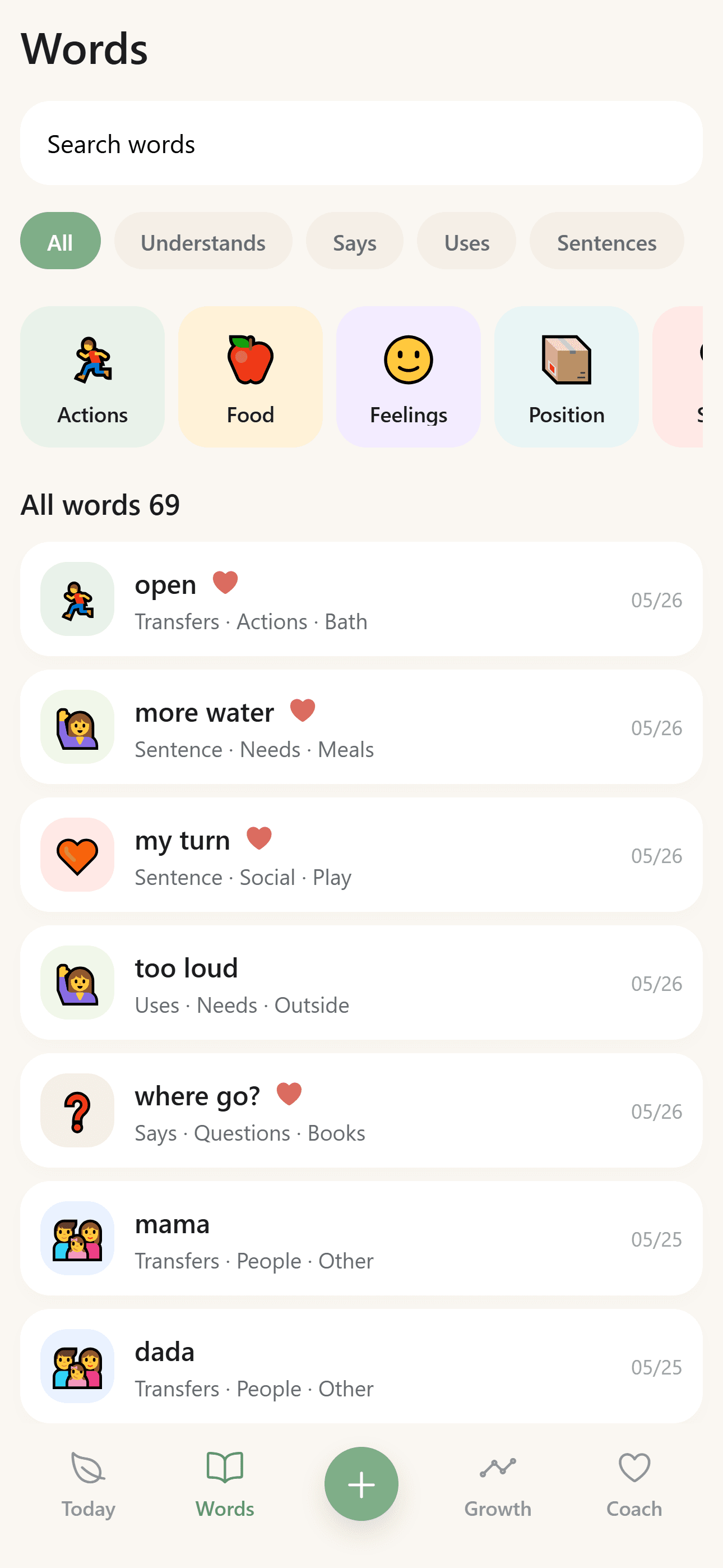
A baby word tracker gives each entry a consistent shape. In BabyTracker, a record can include a stage, category, scene, date, favorite state, and optional note.
That structure supports several practical tasks:
- Search for a word without scanning one long document.
- Filter records by understanding, speaking, use, or sentences.
- Browse categories such as actions, food, feelings, position, social words, and questions.
- Review recent entries separately from older ones.
- Look at weekly and category patterns based on what you recorded.
The tradeoff is that structured fields require a few more taps. A useful tracker should keep those taps small enough that recording still fits everyday family life.
Choose Based on the Question You Will Ask Later
Think about the future use of the journal.
Use a plain note if your main question is, "What were the words I never want to forget?" A dated list or story may preserve that memory beautifully.
Use a dedicated tracker if your questions are closer to, "How was this word being used?" "Where did it appear?" or "What kinds of expressions have I recorded recently?"
Neither approach should be treated as a developmental test. The structure is for organization and reflection, not for ranking a child or predicting an outcome.
Avoid Turning the Journal into Homework
The best system is the one you can keep using. A complex tracker is not helpful if you delay entries until the context is forgotten. A note is not helpful if it becomes too long to review.
Whichever tool you choose, keep a minimum entry format. A word, date, and one useful detail are usually enough. Add more only when the detail changes what the entry means.
You can also use both approaches. Keep a broader family journal in Notes and use BabyTracker for the structured word library. The tools do not need to compete for every memory.
Privacy Is Part of the Choice
Family language records can feel personal. Before choosing a tracker, check whether it requires an account, uploads records for cloud sync, includes advertising tracking, or offers a local-only path.
BabyTracker stores the baby profile and word records locally, does not require an account, and does not provide cloud sync. That makes it suited to parents who prefer a focused on-device journal. Optional AI features have a separate consent and data-use boundary.
The Short Version
Notes is better for a free-form memory list. A dedicated baby word tracker is better when you want consistent stages, categories, scenes, search, and summaries.
BabyTracker is the structured option: a local iPhone journal for recording and reviewing early language moments without presenting them as medical or developmental conclusions.